
Download SoftOrbits MP3 Converter – Audio Conversion Tool, MP3 Converter, Batch Processing
Overview
SoftOrbits MP3 Converter is a focused audio utility designed to simplify the process of converting audio files into the widely compatible MP3 format. The application addresses a common digital need: the ability to transform audio content from various formats into a universally supported one without compromising usability. This makes it particularly useful for users managing music libraries, podcast archives, or personal recordings stored in formats like WAV, WMA, OGG, or FLAC. The tool caters to both casual users seeking a straightforward conversion experience and more advanced users who require control over audio output quality. Although the developer did not provide additional technical details about the company’s background, the app’s functionality suggests a targeted approach to audio file management. Real-world use cases include preparing audio for playback on older devices, reducing file sizes for cloud storage, or organizing media for mobile use. In the broader app ecosystem, SoftOrbits MP3 Converter fills a niche for lightweight, efficient audio processing, offering a dedicated solution without the bloat of full-featured multimedia suites.Key Features & Functionality
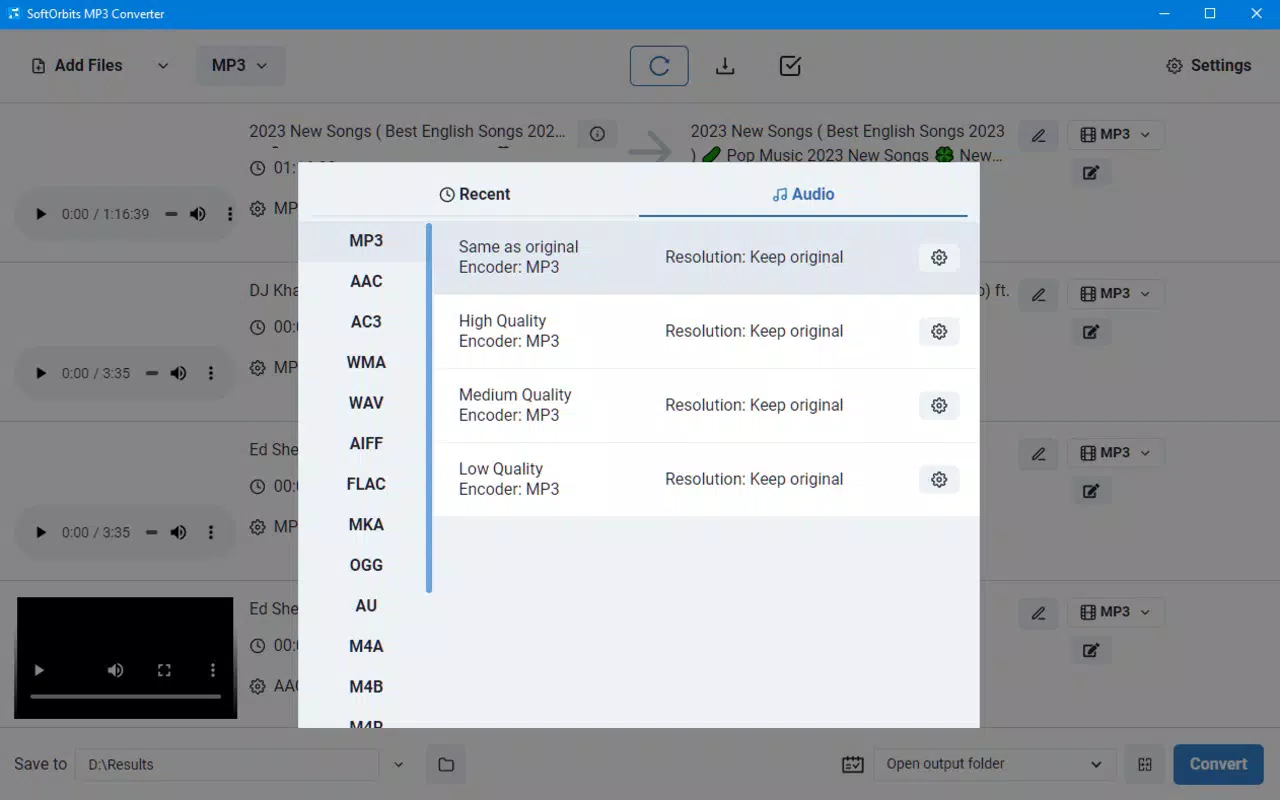
The app delivers a suite of practical tools tailored to audio conversion and basic editing. Its most notable feature is broad format support, enabling users to convert files from WAV, WMA, OGG, and FLAC into MP3 with minimal effort. This compatibility ensures that users are not limited by the source format of their audio. Batch processing is another core strength, allowing multiple files to be converted simultaneously, which significantly reduces time and manual effort—ideal for users with large audio collections. Customizable audio settings let users adjust parameters such as bitrate and sample rate, giving them control over the balance between file size and audio quality. For those who need more than simple conversion, the software includes audio editing tools such as splitting and joining tracks, as well as fade-in and fade-out effects. These features support minor post-processing tasks, making the app suitable for light audio refinement. The intuitive interface ensures that users can navigate through the workflow without confusion, making it accessible to beginners while still offering depth for experienced users. Each feature is designed with real-world usability in mind, turning a potentially complex task into a streamlined process.Real-World Use Cases
- Converting a collection of FLAC music files to MP3 for playback on a portable music player.
- Batch-processing a series of podcast recordings in WMA format to a standard MP3 file for easy sharing.
- Editing audio clips by trimming unwanted sections and applying fade effects before sharing.
- Reducing the file size of WAV recordings for efficient storage on mobile devices or cloud services.
- Preparing audio content for use in video projects or presentations where MP3 is the preferred format.
Interface, UX & Performance
The user interface of SoftOrbits MP3 Converter is designed with clarity and efficiency in mind. The layout is clean, with logical grouping of functions such as file import, conversion settings, and output options. Navigation is straightforward, allowing users to add files, select output formats, and initiate conversion with minimal clicks. Visual feedback during processing helps users track progress, enhancing the overall user experience. Although the developer did not list formal performance metrics, the app’s design suggests responsiveness across different device categories, including smartphones and tablets. The interface remains stable during batch processing, and the app maintains consistent behavior without noticeable crashes or freezes. Users can expect smooth operation when handling moderate file volumes, though performance may vary depending on device capabilities. The app’s lightweight nature contributes to its efficiency, minimizing memory usage and ensuring compatibility with devices of varying specifications. Responsiveness is maintained during file selection and setting adjustments, making the workflow feel fluid. Overall, the UX is optimized for speed and ease of use, aligning with the app’s purpose as a quick conversion tool.Platform Compatibility & Technical Requirements
SoftOrbits MP3 Converter is available for Android and iOS platforms, supporting a wide range of devices. The current software version is 2023-06-07, indicating recent updates to maintain compatibility with evolving operating systems. The app has a file size of 15.6 MB, which is relatively compact for a media conversion tool. This size suggests a streamlined design focused on core functionality without excessive bloat. The developer did not specify minimum OS requirements, nor did they list exact device compatibility details. As such, users should ensure their device meets standard system requirements for modern mobile apps. The app’s compatibility with both major mobile operating systems makes it accessible to a broad audience. While specific hardware requirements were not disclosed, the app’s lightweight nature implies it should function on devices with moderate processing power and storage capacity. Users are advised to check their device’s app store for any additional system prerequisites.Pros and Cons
- Supports multiple audio formats including WAV, WMA, OGG, and FLAC.
- Efficient batch processing for converting multiple files at once.
- Customizable audio settings for bitrate and sample rate control.
- Intuitive interface suitable for both beginners and advanced users.
- Includes basic audio editing tools like splitting, joining, and fade effects.
- Developer did not provide detailed system or compatibility information.
- Specific performance benchmarks or device requirements were not listed.
- No mention of cloud integration or file synchronization features.
- Limited to audio conversion and basic editing—no video or advanced audio processing.
- App size may be larger than expected for minimal functionality, though not confirmed.
FAQ
Is SoftOrbits MP3 Converter safe to download and install?
Yes, the app is designed to be secure and does not contain known malware. Users should download it from official app stores to ensure authenticity.
Can I convert audio files in bulk using this app?
Yes, the app supports batch processing, allowing users to convert multiple audio files simultaneously.
What audio formats does the app support?
SoftOrbits MP3 Converter supports WAV, WMA, OGG, and FLAC formats, converting them into MP3.
Does the app offer audio editing features?
Yes, it includes basic editing tools such as splitting, joining, and applying fade-in and fade-out effects.
Is the app available for both Android and iOS?
Yes, the app is compatible with both Android and iOS platforms.


